














When setting up a home entertainment system, many users come across the term “soundbar pass-through” without fully understanding what it means or whether it actually matters. If you’re connecting a TV, a soundbar, and devices like a game console or streaming box, pass-through can play a bigger role than you might expect.
In this guide, we’ll explain what soundbar pass-through is, how it works, and how to choose the right level of support for 1080P, 4K, or even 8K video.
What Does Pass-Through Mean on a Soundbar?
In simple terms, pass-through means that a soundbar allows a video signal to pass through it unchanged and continue on to your TV or projector.
When pass-through works correctly, the video keeps its original resolution, color format, and dynamic range. The soundbar focuses on audio processing while the display receives the video signal exactly as intended. Most soundbar pass-through setups rely on HDMI, which carries both audio and video through a single cable.
How Soundbar Pass-Through Works
In a typical setup, your source device such as a game console, media player, or streaming box connects directly to the soundbar. The soundbar then sends the video signal to the TV or projector.
This connection method is especially useful when your TV has limited HDMI ports or when you want consistent audio performance across multiple devices. It can also help reduce audio delay during gaming or fast-paced content.
1080P Pass-Through: Who Is It For?
1080P pass-through is the most basic level and is mainly suitable for older setups.
Typical use cases
Users with Full HD TVs, Blu-ray players, or basic streaming devices benefit from stable video transmission without quality loss.
Is it still relevant?
For most modern households, 1080P pass-through is no longer a priority feature. If you’re planning to upgrade to a 4K TV, it’s usually better to skip this level and look ahead.
4K Pass-Through: The Current Mainstream Standard
For most home entertainment systems today, 4K pass-through is the ideal balance between performance and practicality.
What 4K pass-through supports
A proper 4K pass-through solution allows 4K resolution, HDR formats such as HDR10 or Dolby Vision, and low-latency video for gaming and fast-moving scenes.
A practical example
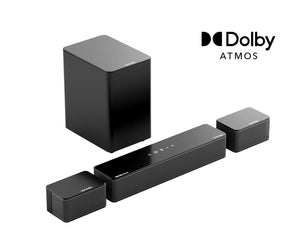
For users building a modern 4K home theater, the Skywave X70 Soundbar is designed to handle 4K pass-through smoothly. This lets connected devices deliver full-resolution video to the TV while the soundbar focuses on immersive audio.
If you own a 4K TV and regularly watch movies, stream shows, or play console games, 4K pass-through is the level you should be looking for.
8K Pass-Through: Do You Really Need It?
8K pass-through supports extremely high-bandwidth video signals designed for next-generation displays.
Who should consider 8K pass-through
This option is best for advanced users with high-end TVs or projectors, gamers planning long-term upgrades, or anyone who wants a future-ready home theater system.
Future-focused soundbar options
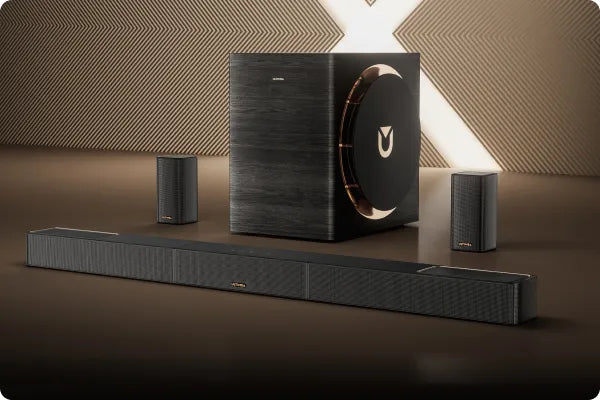
Models such as Skywave X100 and Skywave X100 Dual are built with higher-bandwidth pass-through in mind. They are suitable for users who want to be prepared for future video standards without needing another upgrade later.
For everyday viewing, however, most users won’t see immediate benefits from 8K pass-through.
Pass-Through vs ARC vs eARC: What’s the Difference?
Pass-through sends video signals from the source device to the TV through the soundbar. ARC sends audio from the TV back to the soundbar. eARC is an enhanced version of ARC that supports higher-quality audio formats and greater bandwidth.
If all your devices connect directly to the TV, ARC or eARC may be enough. Pass-through becomes more important when devices are connected to the soundbar instead.
Common Pass-Through Problems and How to Avoid Them
Some users experience issues such as missing video, limited resolution, HDR not working, or increased input lag.
These problems are often caused by HDMI cables that don’t support the required bandwidth, mismatched HDMI versions between devices, or incorrect TV and source settings. Using certified HDMI cables and checking device compatibility can help avoid most issues.
How to Choose the Right Soundbar with Pass-Through
Before choosing a soundbar, consider your current setup and whether you plan to upgrade in the future.
Pass-through comparison overview
| Pass-Through Level | Best For | Typical Use Scenarios | What You Get | Product Reference |
| 1080P Pass-Through | Entry-level users | Full HD TVs, basic streaming, Blu-ray playback | Stable video signal and simple connections | — |
| 4K Pass-Through | Most home users | 4K TVs, movies, streaming, console gaming | Full 4K resolution, HDR support, low-latency viewing | Skywave X70 Soundbar |
| 8K Pass-Through | Advanced and future-ready setups | High-end TVs or projectors, next-gen gaming, long-term upgrades | Higher bandwidth and future compatibility | Skywave X100, Skywave X100 Dual |
A simple decision guide
If you’re using a 4K TV today, 4K pass-through offers the best balance of performance and practicality. If you’re planning a premium or future-proof setup, 8K pass-through provides more flexibility over time.
Final Thoughts
Soundbar pass-through isn’t about chasing the highest number. It’s about choosing what fits your system and usage habits. Understanding pass-through helps you avoid unnecessary upgrades while ensuring you get the best possible audio and video experience from your home entertainment setup.


