













Buying a soundbar is one of the easiest ways to improve your TV audio. It can make movies feel bigger, voices easier to hear, and music more enjoyable. But many beginners run into the same problem after setting one up: the sound is louder, yet it still does not feel quite right.
Maybe the dialogue sounds too quiet. Maybe the bass is strong, but voices become muddy. Maybe action scenes are suddenly too loud while normal conversations feel too soft. In many cases, this does not mean something is wrong with the soundbar. It often means the soundbar sound adjustment has not been matched to your room, your TV, or the type of content you watch most.
The good news is that beginners do not need advanced audio knowledge to make a real improvement. A few simple adjustments can help your soundbar sound clearer, more balanced, and more comfortable for everyday use.
What Is Soundbar Sound Adjustment?
Soundbar sound adjustment simply means changing the audio settings so the sound fits your listening needs.
Most soundbars include basic controls such as:
- Volume
- Bass
- Treble
- Dialogue or voice mode
- Night mode
- Surround mode
- Movie, music, sports, or game modes
For beginners, the goal is not to create a perfect studio-level setup. The goal is much simpler: make TV shows, movies, sports, games, and music sound natural and easy to enjoy.
Why Sound Adjustment Matters for Beginners
Many people assume a soundbar should sound perfect as soon as it is connected. While most soundbars are designed to work quickly, every home is different.
Your sound can be affected by:
- Room size
- Furniture placement
- TV position
- Floor type
- Wall materials
- Where the soundbar is placed
This is why sound adjustment matters. It helps your soundbar work better in your actual living space.
A small apartment living room may make bass sound stronger than expected. A large open-plan room may make dialogue feel less focused. A soundbar placed inside a TV cabinet may sound blocked or dull. By adjusting the soundbar, beginners can avoid common audio problems and get a more enjoyable listening experience without replacing equipment or adding complicated accessories.
Key Soundbar Settings Beginners Should Understand
Bass
Bass controls the deeper sounds, such as explosions, drums, low music notes, and cinematic effects.
Bass can make movies and music feel more powerful, but too much bass can also make voices sound muddy. If dialogue becomes hard to hear, try lowering the bass slightly. The best bass setting should feel full and warm, not heavy or overwhelming.
Treble
Treble controls the higher part of the sound. It affects speech detail, footsteps, light instruments, and background effects.
If the sound feels dull or unclear, raising treble slightly may help. If the sound becomes sharp, thin, or tiring, lower it a little. Small changes are usually enough.
Dialogue or Voice Mode
Dialogue mode, sometimes called voice mode, is one of the most useful settings for beginners.
It helps make spoken words clearer, especially when watching:
- News
- Movies
- TV dramas
- Documentaries
- Talk shows
- Podcasts or interviews
If voices sound too quiet compared with music or effects, this is usually the first setting to try.
Night Mode
Night mode reduces sudden loud sounds while keeping quieter sounds easier to hear.
This is helpful when watching TV:
- Late at night
- In an apartment
- In a shared home
- With children or family members nearby
It can also make movies more comfortable if you often find yourself turning the volume up and down.
Sound Modes
Many soundbars include preset modes such as Standard, Movie, Music, Sports, or Game.
Each mode changes the sound in a different way:
- Standard Mode: Balanced for everyday use
- Movie Mode: More powerful and immersive
- Music Mode: Better for songs and playlists
- Sports Mode: Makes commentary and crowd sound more lively
- Game Mode: Highlights effects and direction
For beginners, Standard Mode is usually the best place to start. Once you understand how the soundbar behaves, you can switch modes based on what you are watching.
Common Soundbar Problems Beginners Notice
Dialogue Is Too Quiet
This is one of the most common problems. You may turn up the volume to hear people speaking, but then action scenes become too loud.
Try using dialogue mode, voice mode, or slightly increasing treble.
Bass Is Too Loud or Boomy
If the room shakes too much or voices sound unclear, the bass may be too high.
Try lowering bass step by step until speech becomes clearer. In smaller rooms, a moderate bass setting often sounds better than a maximum setting.
Music Sounds Flat
If music feels thin or lifeless, try switching to Music Mode or slightly increasing bass.
If it sounds too sharp, reduce treble a little. A balanced music setting should have clear vocals, steady rhythm, and enough low-end support without sounding cloudy.
Action Scenes Are Too Loud
Movies often have quiet dialogue and loud effects. Night mode can help reduce sudden volume jumps and make the experience more comfortable.
This is especially useful for evening viewing, apartment living, or homes where different people have different volume preferences.
Sound Feels Disconnected From the Screen
If the sound feels like it is coming from the wrong place, check that the soundbar is centered under the TV and facing the listener.
Also make sure nothing is blocking the front or top of the soundbar.
Beginner-Friendly Soundbar Adjustment Tips
Start With Standard Mode
Standard Mode gives you a balanced starting point. It is easier to understand what needs changing when you begin from a neutral setting.
Adjust One Setting at a Time
Do not change bass, treble, dialogue mode, and surround mode all at once.
Make one small change, listen for a few minutes, then decide whether it sounds better. This helps you understand what each setting actually does.
Use Dialogue Mode First
If your main problem is unclear voices, start with dialogue or voice mode before changing everything else.
For many beginners, this single adjustment can make TV shows, movies, and streaming content much easier to follow.
Lower Bass If Voices Sound Muddy
Heavy bass can cover speech. If dialogue feels buried under music or effects, reduce bass slightly.
This does not mean removing bass completely. It simply means keeping it balanced so voices remain clear.
Raise Treble Slightly for More Clarity
A small treble increase can help voices and details sound clearer. Avoid setting it too high, or the sound may become harsh.
The best treble setting should add clarity without making the sound uncomfortable.
Test With Different Content
Use different types of content to test your settings:
- A news program
- A movie scene
- A music video
- A sports clip
- A regular TV show
This helps you find settings that work well for everyday listening instead of only sounding good with one type of content.
Room Setup Also Affects Sound
Soundbar sound adjustment is not only about remote-control settings. Placement also plays a major role.
For better sound, try to make sure:
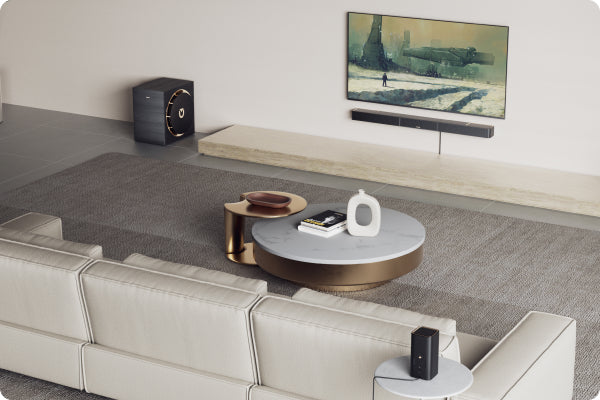
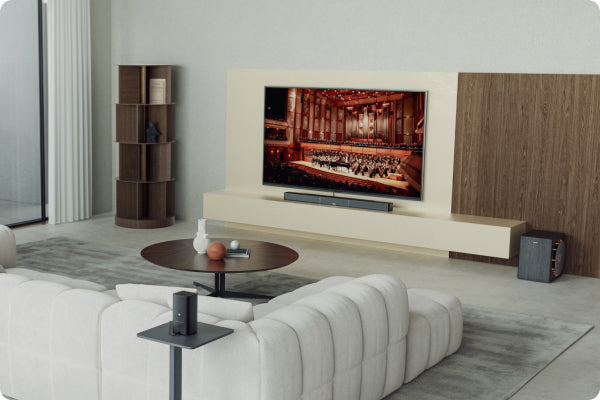
- The soundbar is centered under the TV
- The front of the soundbar is not blocked
- The soundbar faces the main listening area
- It is not placed deep inside a cabinet
- It is not covered by decorations or objects
If your room has hard floors, glass surfaces, or bare walls, the sound may feel brighter or more echo-like. Rugs, curtains, and soft furniture can help make the sound feel more natural.
Even small placement changes can improve clarity. Moving a soundbar forward on a TV stand, clearing objects from in front of it, or centering it more accurately can make the sound feel more direct.
Common Mistakes Beginners Should Avoid
Turning Bass All the Way Up
Strong bass can be exciting, but maximum bass is rarely the best setting for clear everyday listening.
If voices become unclear, the first step is often to reduce bass rather than increase the overall volume.
Using Surround Mode for Everything
Surround mode can be great for movies and games, but it may not be ideal for news, dialogue-heavy shows, or casual TV.
If voices become less focused, switch back to Standard Mode or turn on dialogue enhancement.
Ignoring TV Audio Settings
Sometimes the issue is not only the soundbar. Your TV audio output settings also matter.
Make sure your TV is sending sound to the soundbar correctly. If available, check whether your TV is set to external speaker, HDMI ARC, optical output, or the audio connection you are using.
Blocking the Soundbar
Avoid placing the soundbar behind objects, inside a closed cabinet, or too far away from the listening area.
Sound needs a clear path to reach you. If the speaker area is blocked, the audio may sound muffled even when the settings are correct.
Expecting One Setting to Work for Everything
Movies, music, sports, and games are mixed differently. It is normal to change modes depending on what you are watching.
A good everyday setup should be flexible, not fixed forever.
Beginner Soundbar Adjustment Checklist
Before deciding your soundbar does not sound right, go through this quick checklist:
- Can you hear dialogue clearly without raising the volume too high?
- Is the bass full but not overpowering?
- Are loud scenes comfortable to listen to?
- Does music sound balanced instead of flat or harsh?
- Is the soundbar centered and facing the listening area?
- Is anything blocking the front or top of the soundbar?
- Have you tried Standard Mode before using other sound modes?
- Have you tested dialogue mode, night mode, or treble adjustment?
If the answer to most of these questions is yes, your soundbar is likely much closer to a comfortable everyday setup.
Better Sound Starts With Small Adjustments
For beginners, soundbar sound adjustment may seem confusing at first, but it does not have to be technical.
Most improvements come from understanding a few simple settings:
- Bass
- Treble
- Dialogue mode
- Sound modes
- Night mode
- Placement
The best sound is not always the loudest sound. It is the sound that makes voices clear, effects enjoyable, music balanced, and everyday viewing comfortable.
Whether you are watching movies, streaming shows, playing games, or listening to music, small adjustments can help your soundbar fit your room and your habits.
At Ultimea, we believe better home audio should feel simple, clear, and easy to enjoy from the very beginning.

